AI image generation did not evolve in a straight line from bad pictures to better pictures. The real change was deeper: image models moved from one-shot prompt machines into editable visual systems.
In the early stage, the magic was simple: type a sentence, wait a few seconds, and get an image that never existed before. Today, the important question is no longer only "Can the model generate a good image?" The better question is "Can I keep working with the image until it is useful?"
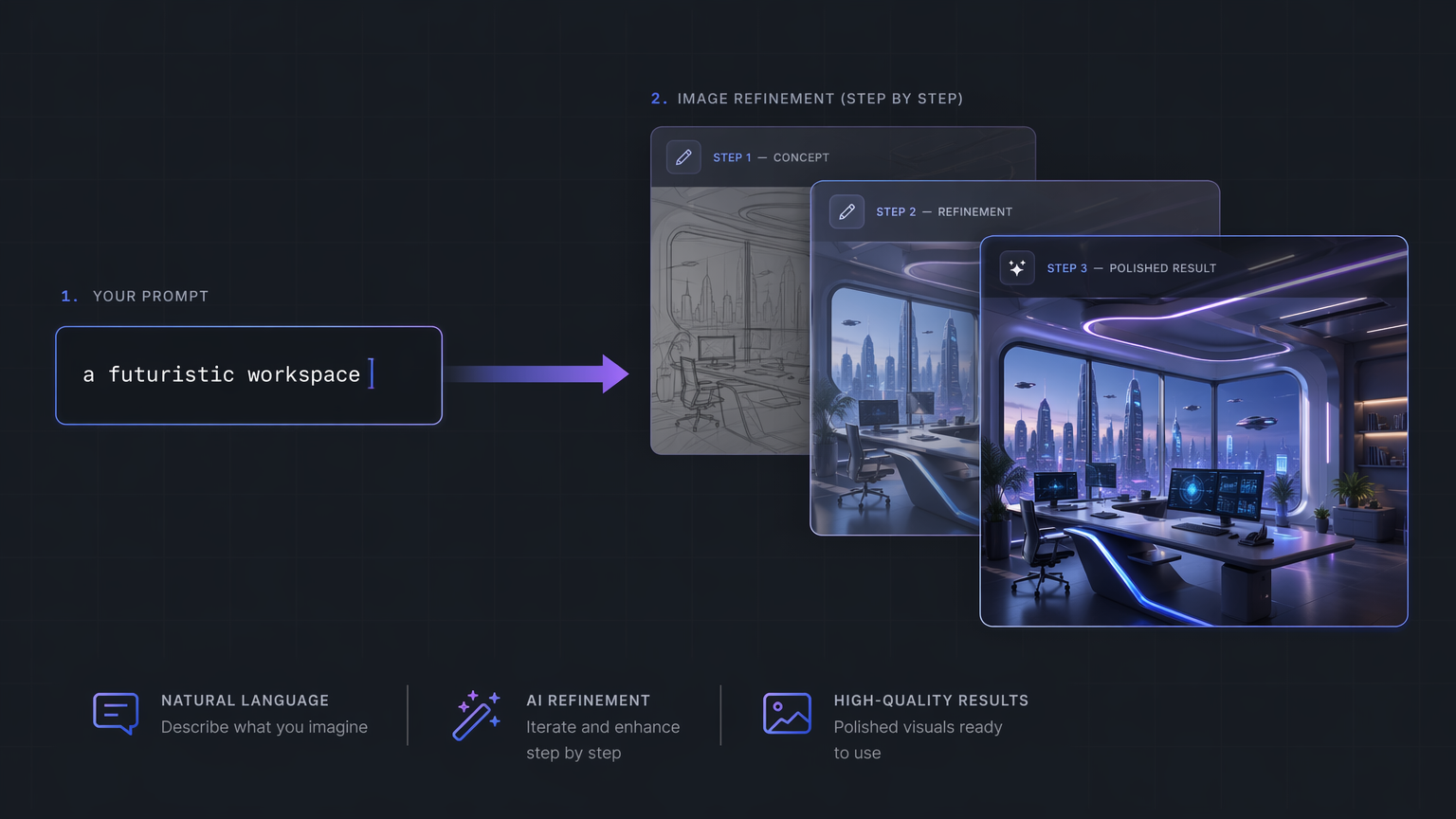
Modern AI image generation is shifting from one prompt and one output toward a full creative workflow.
TL;DR
AI image generation has moved through four major phases: text-to-image demos, diffusion-based quality, open and customizable model ecosystems, and multimodal editing workflows. The biggest shift is not just realism. It is control. Modern creators need reference images, consistent characters, natural-language edits, and iteration without restarting. That is why image editing has become more important than image generation alone.
AI image generation timeline: 2021 to 2026
The easiest way to understand AI image generation in 2026 is to separate model progress from workflow progress. Better pixels mattered, but better control mattered more.
| Era | Representative systems | What changed | Main limitation |
|---|---|---|---|
| 2021 | DALL-E | Text became a visual interface | Results were hard to steer after generation |
| 2022-2023 | Stable Diffusion, DALL-E 2, SDXL | Diffusion quality became mainstream | Users still regenerated too often |
| 2024 | Stable Diffusion 3, FLUX.1 | Open and customizable workflows grew | Setup and control tools were complex |
| 2025 | GPT-4o image generation, gpt-image-1, Nano Banana | Multimodal editing became mainstream | Consistency and precise preservation still broke |
| 2026 | Editing-first image tools | Sessions, references, and refinements define the product | Trust, provenance, and brand control still matter |
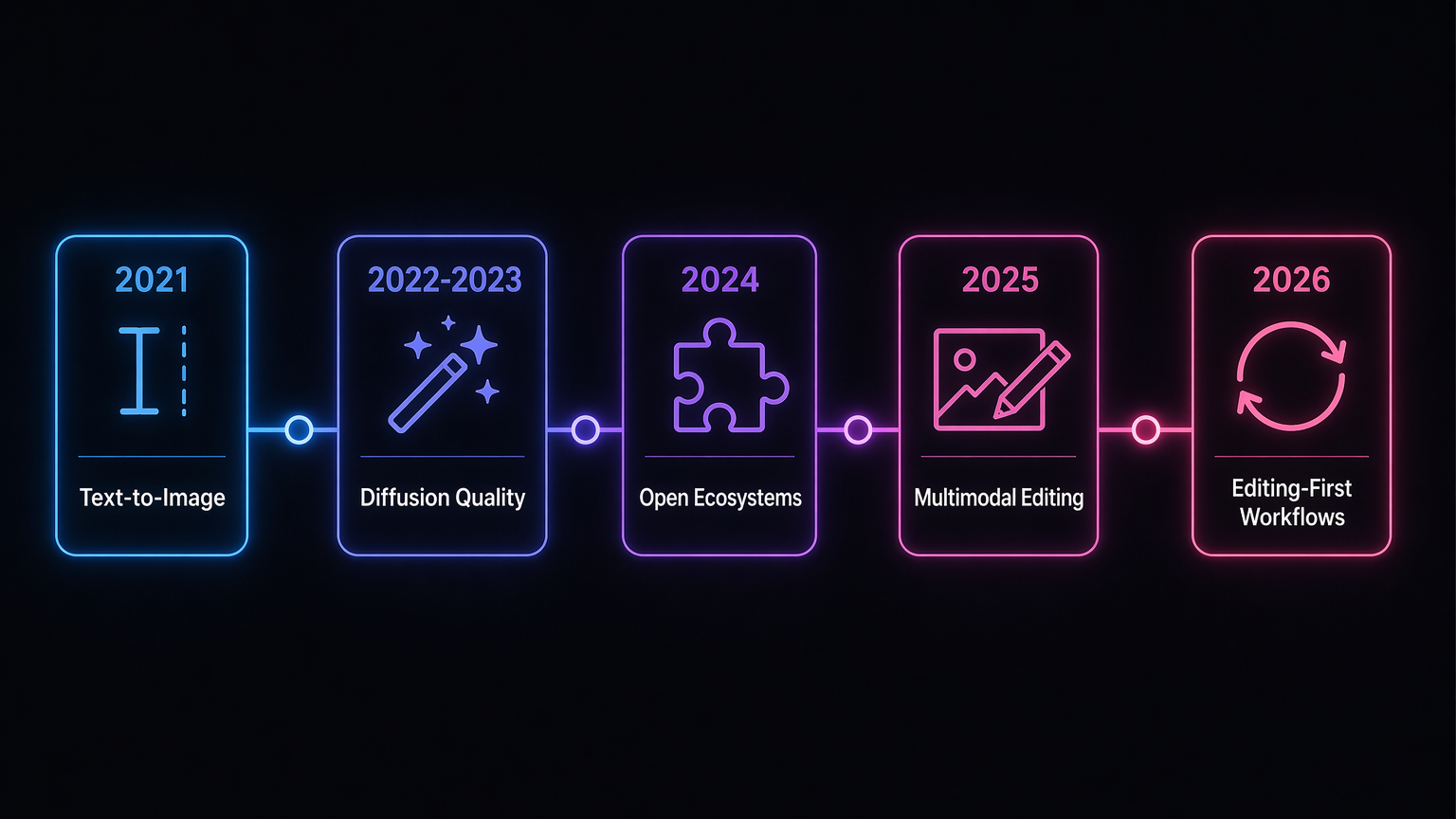
The field moved from text-to-image novelty toward editing-first creative loops.
What changed in AI image generation workflows?
AI image generation changed from a prompt-to-output trick into a visual workflow. Early systems proved that language could become images. Diffusion models made the results sharper and more flexible. Open model ecosystems made customization normal. Multimodal models made editing feel conversational.
The old workflow looked like this:
- Write a prompt.
- Generate four images.
- Pick the least broken one.
- Rewrite the prompt.
- Start again.
The new workflow is different:
- Start with a prompt, image, sketch, or reference.
- Generate a strong first draft.
- Keep the parts that work.
- Edit the weak parts with instructions.
- Iterate until the image is ready to use.
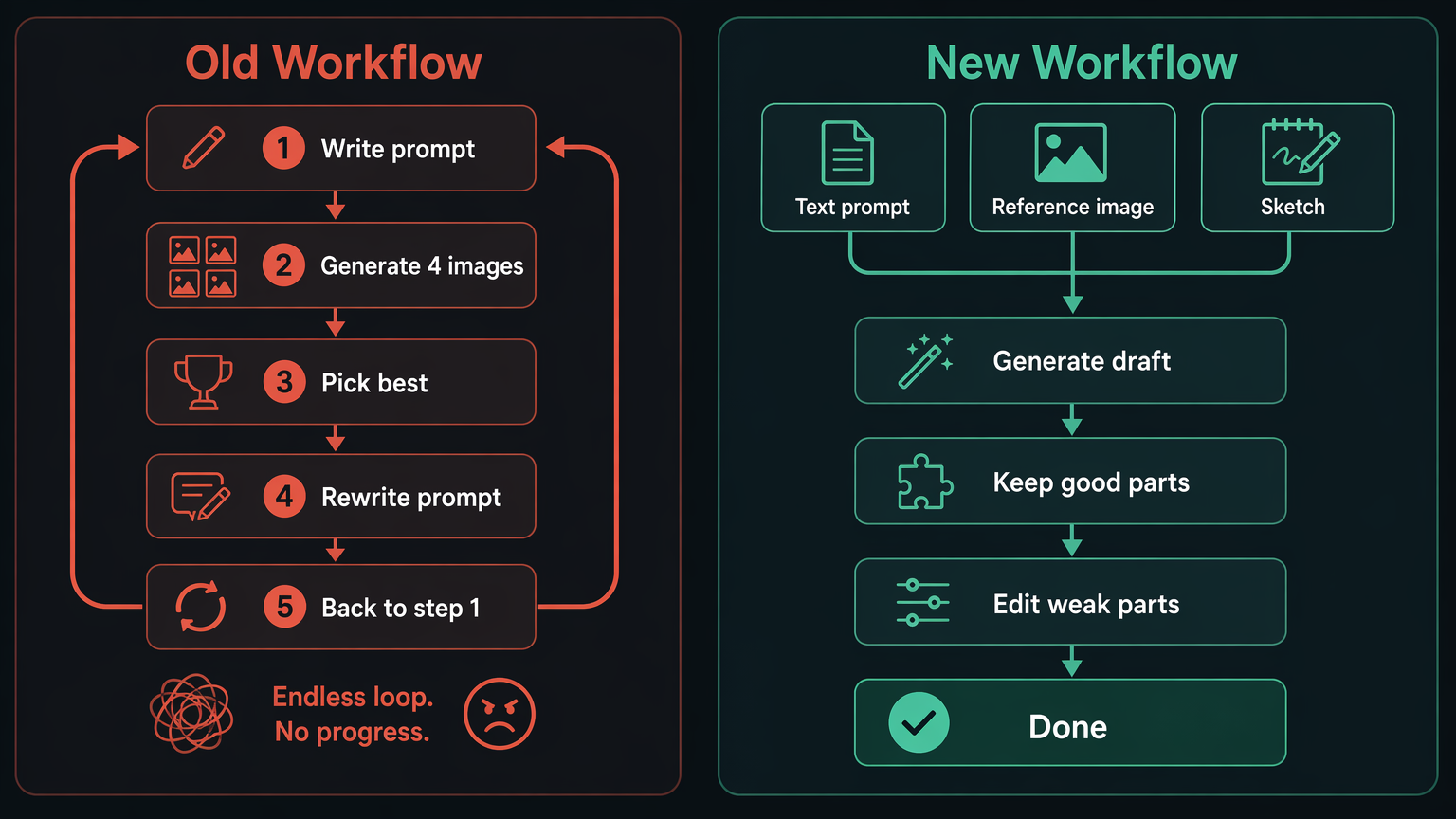
That shift matters because real creative work is almost never one-shot. Social posts, thumbnails, ads, product images, landing page visuals, blog illustrations, and pitch deck graphics all need revision. The value is not only in making an image appear. The value is in finishing it.
Text-to-image generation made language the interface
The first major public shift came when text became a practical interface for image creation. OpenAI introduced DALL-E in January 2021 as a model trained on text-image pairs to generate images from text descriptions. The important breakthrough was not that every image was production-ready. It was that ordinary language could become a way to direct image creation.
Before that moment, image creation required specialized tools, stock libraries, photography, illustration, or design labor. DALL-E showed a different interface: describe a scene and let the model synthesize it.
This changed the mental model of visual creation. A user no longer had to start with a blank canvas. They could start with intent.
The weakness was also obvious. Text prompts are underspecified. A phrase like "a futuristic workspace" can mean thousands of different things. The model has to guess composition, lighting, style, objects, camera angle, color, mood, and level of detail. That makes prompt-to-image powerful, but also unstable.
Early AI image generation was impressive because it expanded imagination. It was frustrating because users had limited ways to correct the model after the first result.
Diffusion models made AI image quality mainstream
Diffusion models changed the quality bar. Instead of treating image generation as a novelty, the field began producing images that looked good enough for design exploration, concept art, marketing drafts, and social content.
Stable Diffusion was especially important because it connected model quality with an open ecosystem. Users could run models locally, fine-tune styles, build workflows, and combine tools. That changed image generation from a closed product into an open creative toolkit.
The diffusion era improved three things at once:
- Image quality: Better texture, lighting, composition, and detail.
- Accessibility: More people could generate images without expensive creative pipelines.
- Extensibility: The community could build model variants, workflows, and control tools.
This is where AI image generation stopped being only a demo and started becoming a production habit. Designers used it for moodboards. Marketers used it for campaign drafts. Indie founders used it for landing page assets. Creators used it to explore ideas faster than manual tools allowed.
But diffusion did not eliminate the core problem. A stronger first image still did not guarantee a final image. The model could create a compelling scene and still fail on a logo, hand, face, product detail, or text element. The output was better, but the workflow still leaned too heavily on regeneration.
Open AI image models made customization the product
Open and semi-open image models pushed the market in a different direction: control, portability, and customization.
Stable Diffusion 3 Medium, Stable Diffusion 3.5, and FLUX.1 all represented a broader movement. The competition was no longer only "which model makes the prettiest image?" It became "which model can fit into a creator's actual pipeline?"
This mattered because professional visual work has constraints. A creator may need the same character across multiple scenes. A brand may need a consistent color system. A product team may need specific composition rules. A marketer may need image variants for five ad formats. A game studio may need assets that share a visual language.
Customization made image generation feel less like gambling. It also exposed a deeper truth: model quality is only one layer of the product. The surrounding workflow matters just as much.
Open ecosystems made that obvious. People built node-based pipelines, LoRA styles, ControlNet workflows, inpainting tools, upscalers, prompt libraries, and batch generation systems. The model was the engine, but the workflow was the vehicle.
This was the first major lesson for product builders in AI image generation: do not sell the model alone. Sell the path from idea to usable image.
Advanced path: ControlNet, LoRA, and ComfyUI
For advanced users, the open model wave created a practical stack:
| Tooling layer | What it controls | When it matters |
|---|---|---|
| LoRA | Style, subject, or domain adaptation | Repeating a brand look, character, product, or niche visual style |
| ControlNet | Pose, edges, depth, layout, and structure | Keeping composition stable while changing style or details |
| ComfyUI | Node-based workflow assembly | Chaining generation, inpainting, upscaling, and batch variations |
| Inpainting | Local replacement | Fixing one broken area without throwing away the full image |
| Upscalers | Resolution and polish | Preparing a draft for web, print, or campaign use |
This path is powerful, but it is not simple. It proves why consumer and SaaS tools have a different job: hide the pipeline, preserve the control.
Multimodal AI image models changed the job
The next shift came from multimodal models. These systems did not treat image generation as an isolated feature. They connected language, visual understanding, editing, and world knowledge.
OpenAI's 4o image generation release in March 2025 was important because it framed image generation as a native multimodal capability, not a separate image tool bolted onto a chat interface. A month later, OpenAI introduced gpt-image-1 in the API, making the same direction available to developers building image generation and editing products.
This changed user expectations.
Users no longer wanted to write fragile prompts full of camera jargon. They wanted to say:
- "Make this product photo cleaner."
- "Keep the same person, but change the outfit."
- "Turn this sketch into a polished landing page illustration."
- "Use this image as the style reference."
- "Remove the distracting object in the background."
That is not just generation. It is telling the model what to change while it remembers what to keep.
The best image systems started to feel less like slot machines and more like visual collaborators. They could understand the image, accept feedback, and preserve context. That is the foundation for the next stage of AI image tools.
AI image generation tools compared
The major systems are not interchangeable. Each pushed the market from a different direction.
| Tool or model family | Best-known contribution | Why it mattered |
|---|---|---|
| DALL-E | Text-to-image interface | Made natural language feel like a creative input |
| Stable Diffusion | Open diffusion ecosystem | Let users customize, fine-tune, and run workflows outside one closed app |
| FLUX.1 | High-quality open-weight image generation | Raised expectations for open model quality and prompt adherence |
| GPT-4o / gpt-image-1 | Multimodal generation and API access | Connected image generation with language understanding and developer workflows |
| Nano Banana | Viral natural-language image editing | Made consistency, blending, and iterative edits feel mainstream |
| GPT Image 2-style tools | Editing-first production workflow | Focused on finishing usable visuals, not only producing first drafts |
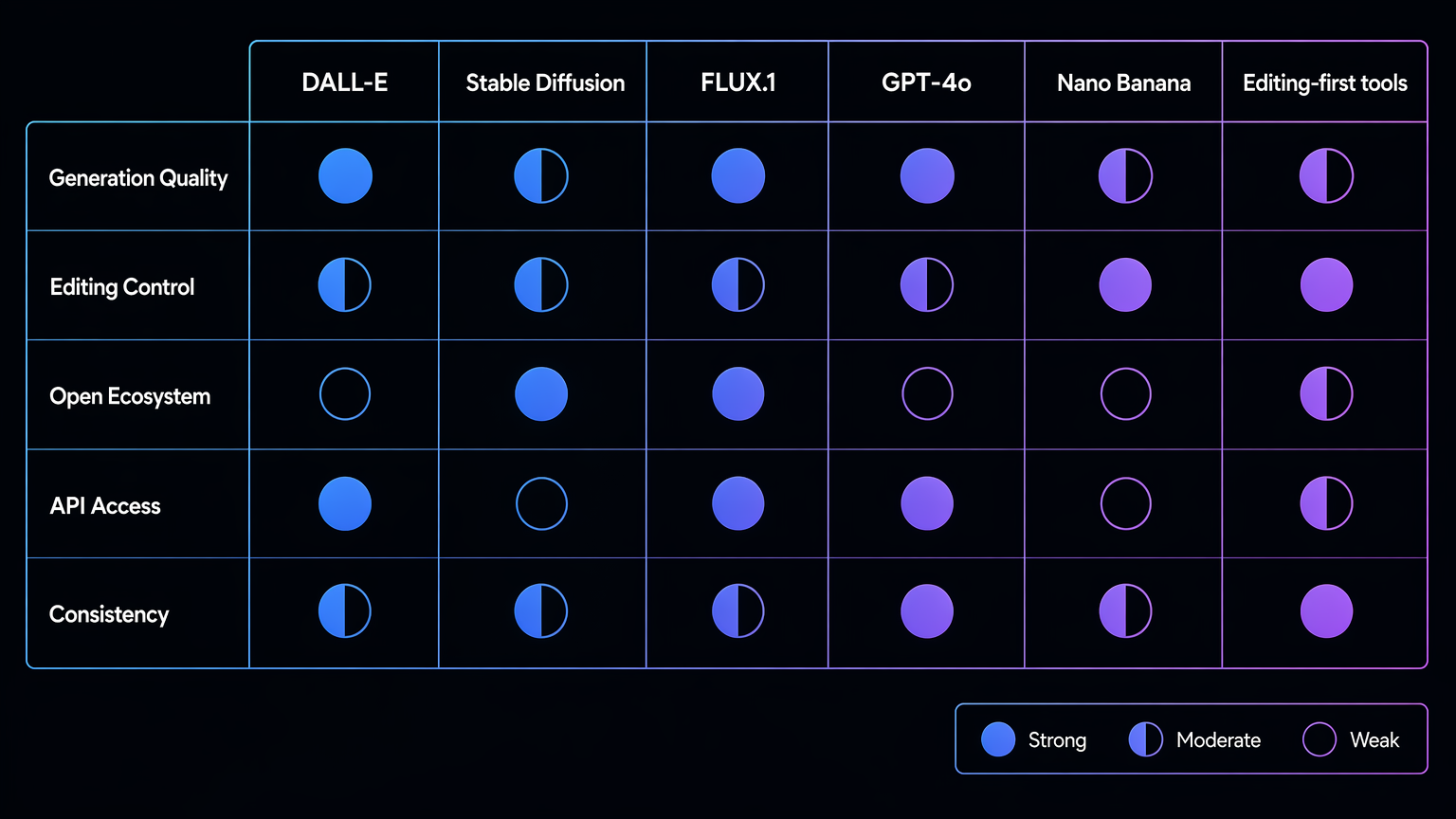
Nano Banana made AI image editing go viral
Nano Banana deserves its own chapter because it made the editing shift obvious to mainstream users.
Google introduced Gemini 2.5 Flash Image, also known as Nano Banana, as an image generation and editing model in 2025. The reason it spread so quickly was not only image quality. It was the feeling of control. Users could blend photos, keep a consistent look across edits, and transform images with natural language.
That made image editing feel simple.
For many users, Nano Banana was the moment AI image generation stopped feeling like prompt engineering and started feeling like direct manipulation. Upload an image. Ask for a change. Keep the subject. Adjust the scene. Try another version. The model still made mistakes, but the workflow felt closer to how people actually think.
The market reaction revealed something important: the next wave of AI image adoption is driven by editing, not just generation.
People do not only want "a cyberpunk portrait." They want their own portrait transformed while still looking like them. They do not only want "a product ad." They want their product preserved while the lighting, background, and composition improve. They do not only want "an illustration." They want an illustration that matches a reference, fits a layout, and can be revised.
Nano Banana became a signal. The winning experience is not the model that generates the most surprising first image. It is the tool that lets users keep moving after the first image.
AI image editing is more important than generation
Image editing became the center of the workflow because the first output is rarely the final output.
This is the same truth every designer already knows. The first draft is direction. The second and third drafts are where the work becomes useful. AI does not remove that process. It compresses it.
For practical creators, the important capabilities are:
- Reference images: Start from a visual direction instead of pure text.
- Image-to-image editing: Transform an existing asset without rebuilding it from zero.
- Local changes: Fix one part while preserving the rest.
- Character consistency: Keep the same person or subject across scenes.
- Style consistency: Maintain a visual language across a campaign or page.
- Fast iteration: Move from draft to final without switching tools.
This is where tools like GPT image 2 fit naturally. The point is not only to create a new image from a prompt. The point is to keep generating, editing, refining, and finishing in one place.
Prompt libraries still matter. A strong prompt can create a better first draft. That is why curated examples like GPT Image 2 prompts are useful. But prompts are only the start. The real productivity gain comes when the tool lets users keep the best parts of an image and repair the weak parts.
The philosophical shift is simple: generation creates possibility; editing creates usefulness.
Old prompt vs new workflow prompt
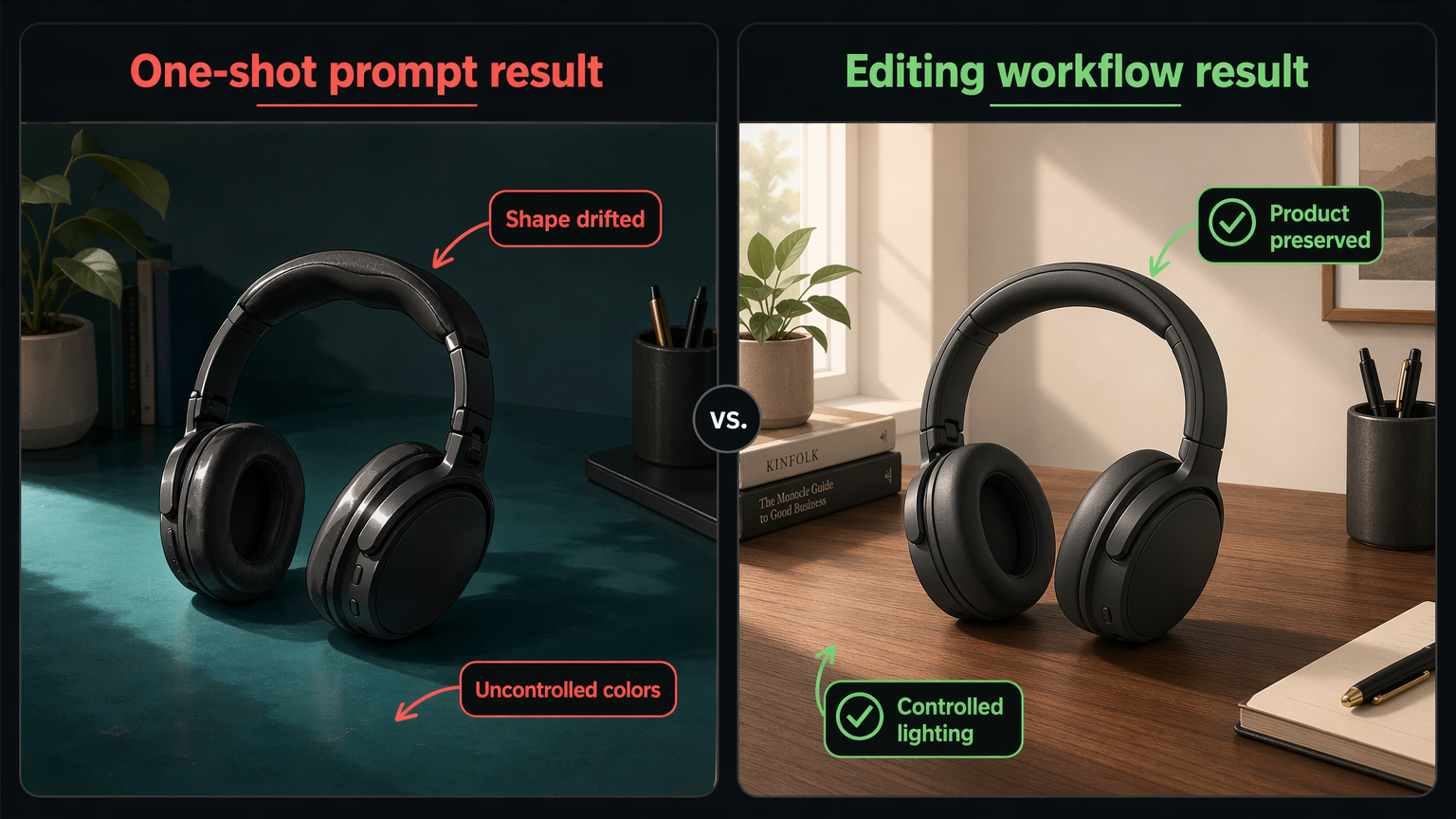
The difference is easiest to see in the prompt itself.
Old one-shot prompt
A cinematic product photo of a wireless headphone on a desk, dramatic lighting, ultra realistic, 4k, professional advertising style.This can create a strong image, but it gives the model too much freedom. The headphone design, desk, colors, crop, and lighting may all drift.
New editing-first workflow
Use this reference image as the exact product shape. Keep the headphones unchanged. Replace the background with a clean walnut desk, add soft morning window light from the left, remove reflections on the ear cups, and keep the final image suitable for a landing page hero.This prompt defines what must stay fixed and what should change. That is the core skill in modern AI image generation: not longer prompts, but clearer instructions about what stays and what changes.
Character consistency example
Keep the same person, face shape, hairstyle, and expression from the reference image. Change only the outfit to a black studio jacket and place the subject in a minimal editorial portrait setting with soft gray background lighting.This is the pattern across professional image work: keeping what works matters as much as creating something new. For real work, preservation is as important as imagination.
What still breaks in AI image generation?
AI image generation is much better than it was, but it is not solved.
The failures are familiar:
- Text in images can still break, especially in dense layouts.
- Hands, fine geometry, and object relationships can still drift.
- Brand consistency is hard without references and constraints.
- Characters may change subtly across multiple images.
- Product details may mutate when the model regenerates a scene.
- Copyright, style imitation, and training data transparency remain unresolved industry issues.
- Safety systems can block legitimate work or fail to block harmful work.
These problems are not random. They come from the nature of generative systems. A model does not store a clean editable design file. It synthesizes pixels from learned patterns, context, and instructions. That makes it powerful, but it also means preservation is hard.
The user asks for one thing to change. The model may change five things. That is the central tension of AI image editing.
The best products will reduce that tension. They will make state clearer, edits narrower, references stronger, and user intent easier to preserve.
Where AI image generation is going next in 2026
The next phase of AI image generation will be less about isolated model launches and more about complete creative systems.
Five trends are already clear.
Generation and editing will merge
Users will not think in separate modes like text-to-image, image-to-image, inpainting, and variation. They will expect one continuous workflow: create, inspect, edit, extend, export.
References will become the default
Pure text prompts are too loose for serious work. Reference images, sketches, brand assets, product photos, and previous generations will become normal inputs.
Prompts will get shorter
As models understand more context, users will rely less on long prompt formulas. The interface will shift from prompt engineering to intent expression.
Provenance will matter more
As images become more realistic, provenance systems such as C2PA metadata and watermarking will become more important. Trust will become a product feature, not only a policy requirement.
Creative tools will become session-based
The most useful tools will remember what the user is building. They will preserve visual direction across multiple edits, assets, and formats. A session will matter more than a single generation.
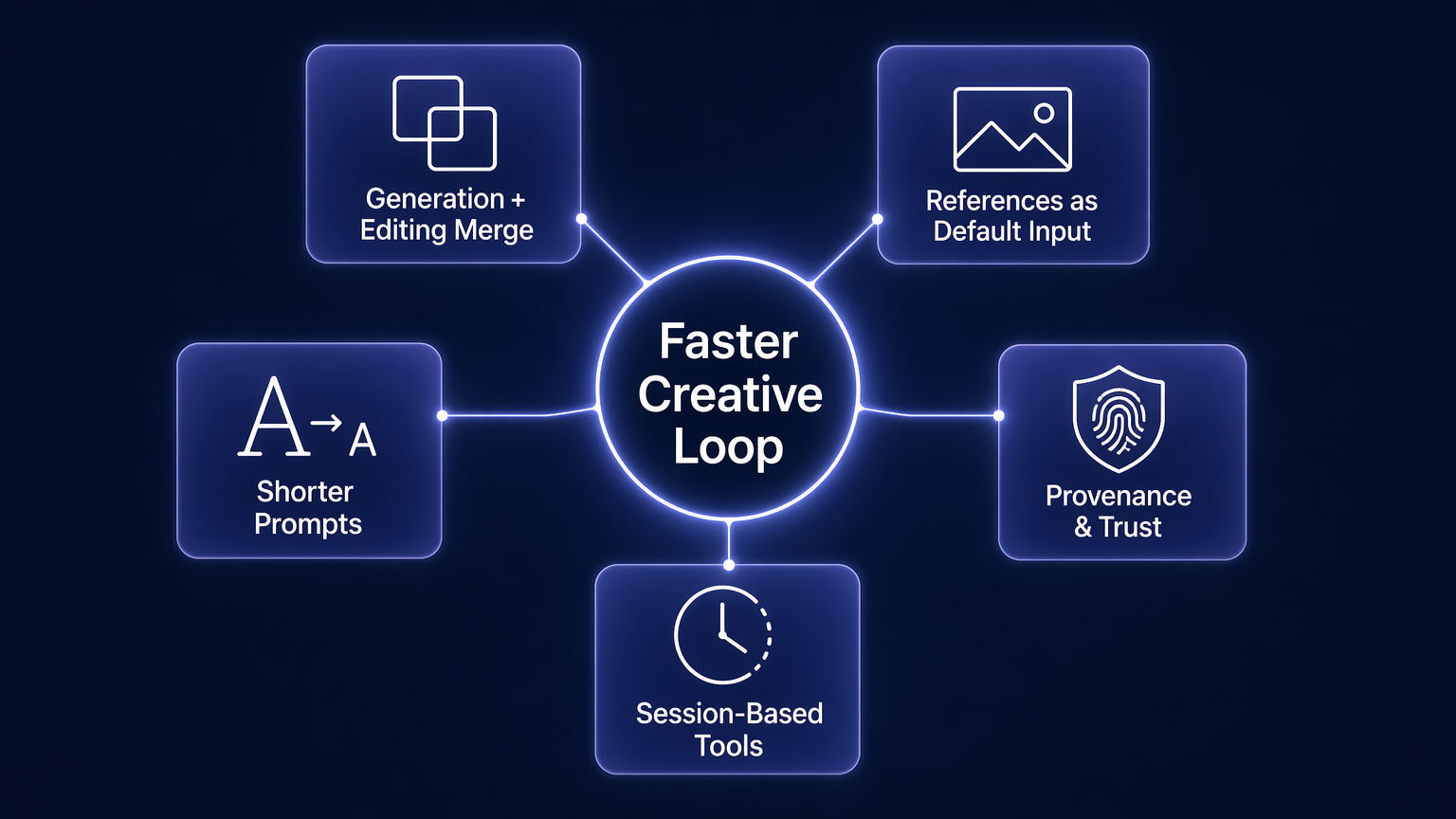
This is the endgame for AI image generation: not a magic button, but a faster creative loop.
A speculative prediction: image models will learn editable intent maps
This section is a guess, not a confirmed roadmap. My prediction is that the next meaningful step in AI image generation will be an "editable intent map" behind every generated image.
Instead of treating an image as one flat result, future tools may quietly split it into intent zones: product shape, character identity, lighting direction, background style, text area, brand colors, camera angle, and parts that are free to change. The user may never see that map as a technical layer. They may only see simple controls like "lock the product," "keep the face," "change only the room," or "make five ad crops without changing the main object."
That would change image editing in a practical way. Today, users often explain preservation in words: keep this, change that, do not touch the logo, preserve the pose. An editable intent map would make those boundaries part of the working file. The model would not just remember the prompt. It would remember which parts of the image are commitments and which parts are still negotiable.
If this happens, the biggest product shift will not be another realism jump. It will be fewer accidental changes. AI image tools will feel less like asking a model to redraw the scene and more like working with a designer who understands what is locked, what is flexible, and what still needs exploration.
Final takeaway: AI image generation is now a workflow
The history of AI image generation is not just a story of better pixels. It is a story of better control.
DALL-E made text feel like a visual interface. Diffusion models made image quality mainstream. Open ecosystems made customization normal. Multimodal models made editing conversational. Nano Banana proved that mainstream users care deeply about controllable image editing.
The lesson is blunt: one-shot generation is not enough.
Creators need a workflow that starts with an idea and ends with a usable asset. That means prompts, references, editing, iteration, and export all belong in the same loop.
That is the direction AI image tools are moving. The future belongs to products that help people finish images, not just generate them.
If you want to try that workflow, start with the AI image generator, use a prompt or reference image, and keep refining until the result is ready to ship.
References
- OpenAI: DALL-E, creating images from text
- OpenAI: DALL-E 2
- Stability AI: Stable Diffusion launch announcement
- Stability AI: Stable Diffusion 3 Medium
- Black Forest Labs: Announcing Black Forest Labs
- OpenAI: Introducing 4o image generation
- OpenAI: Image generation in the API
- Google Developers Blog: Introducing Gemini 2.5 Flash Image
- Google: Nano Banana image editing in Gemini
- Google: Nano Banana trends from 2025